


Two of the coolest new tools in PowerPoint 2010 (especially if you like to make your own graphics) are the Shape Union and Shape Subtract tools. Previously in PowerPoint, if you wanted to join two shapes you would use the Group tool. The issue with grouping shapes was that if you then decided to add certain formatting options to the shape, grouping would add it to each individually element of the shape rather than to the new shape as a whole.

With the Shape Union tool, these shapes can actually be combined as one so that any formatting you apply will apply to the new shape as a whole.
If you've been playing around with PowerPoint 2010 but have no idea what I'm talking about, this is by no fault of your own. This new feature is actually a bit hidden, as it does not appear by default on your Ribbon.
Locating the Shape Union Tool & Adding it To The Ribbon
- Decide where on your Ribbon you would like the Shape Union tool to appear and select that tab. (I typically insert shapes from the Insert tab, so this is where I will be placing mine.)
- Right-click anywhere on the Ribbon and select Customize the Ribbon.

The PowerPoint Options dialog box appears.
- The tab you previously clicked on to customize should be expanded in the menu on the right below Customize the Ribbon. Click anywhere within the expanded tab's menu and then click the New Group button.
- Right click the new group and select Rename from the shortcut menu.
The Rename dialog box appears.
- Select any Symbol you would like and enter a name for your new group into the Display name field.

- From the Choose commands from drop-down menu on the top left, select Commands Not in the Ribbon.
- Scroll down in the menu below Choose commands from until you locate Shape Union (the commands are in alphabetical order).
- Click the Add button.
- Click OK.
The new tool now appears on your ribbon.
Use the Shape Union Tool
- Hold down the [Ctrl] key and click each shape you would like unite.
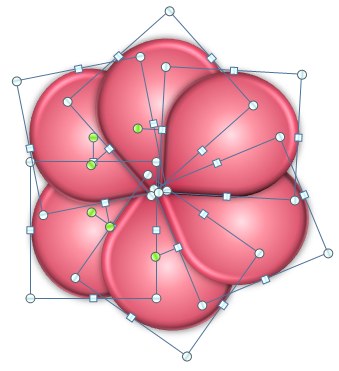
Note: The Shape Union tool does not work on grouped shapes. If you have grouped your shapes you will need to ungroup them before proceeding.
- Locate where on your Ribbon you have placed the Shape Union tool and select it.

And you're done! Your shapes now reflect your formatting option as one cohesive shape instead of many grouped shapes.
Click here for Part II of this post, Using the Shape Subtract Tool.
About the author: AJ George is IconLogic's lead Technical Writer and author of both "PowerPoint 2007: The Essentials" and "PowerPoint 2008 for the Macintosh: The Essentials."


The other related commands -- Shape Subtract, Shape Intersect, and Shape Combine are also useful and very cool.
Posted by: EFinkelstein | October 02, 2010 at 11:51 AM
Thanks for your comment Ellen--the shape tools are really saving my life these days!
PS--I think I have your PPT 2007 book?
Posted by: AJ George | October 04, 2010 at 04:21 PM
thank you! was looking and looking for those dang buttons! :)
Posted by: Meg | September 02, 2011 at 03:21 PM
You're welcome Meg!
Posted by: AJ George | September 06, 2011 at 10:25 AM
You've changed my life!! Thanks forever!!
Posted by: Daniel | June 21, 2012 at 12:51 PM
It's great but I lost all the colour formatting? I ended up with an outline of my figure and no colour.
Posted by: Jill Lyall | December 10, 2012 at 09:20 PM
Hi Jill,
Never seen that happen. If you send me an email to [email protected] with more information I can look into it and potentially write another article about it.
Posted by: AJ | December 11, 2012 at 02:49 PM